 Inference
 Marketplace


Introduction
Radio silence is the administrative disabling of all wireless radio transmission on a node. Organizations deploy radio silence in environments where radio frequency emissions may interfere with nearby instruments, or where regulations prohibit wireless devices in certain areas or during specific procedures. EVE-OS supports two types of radio silence: permanent and temporary.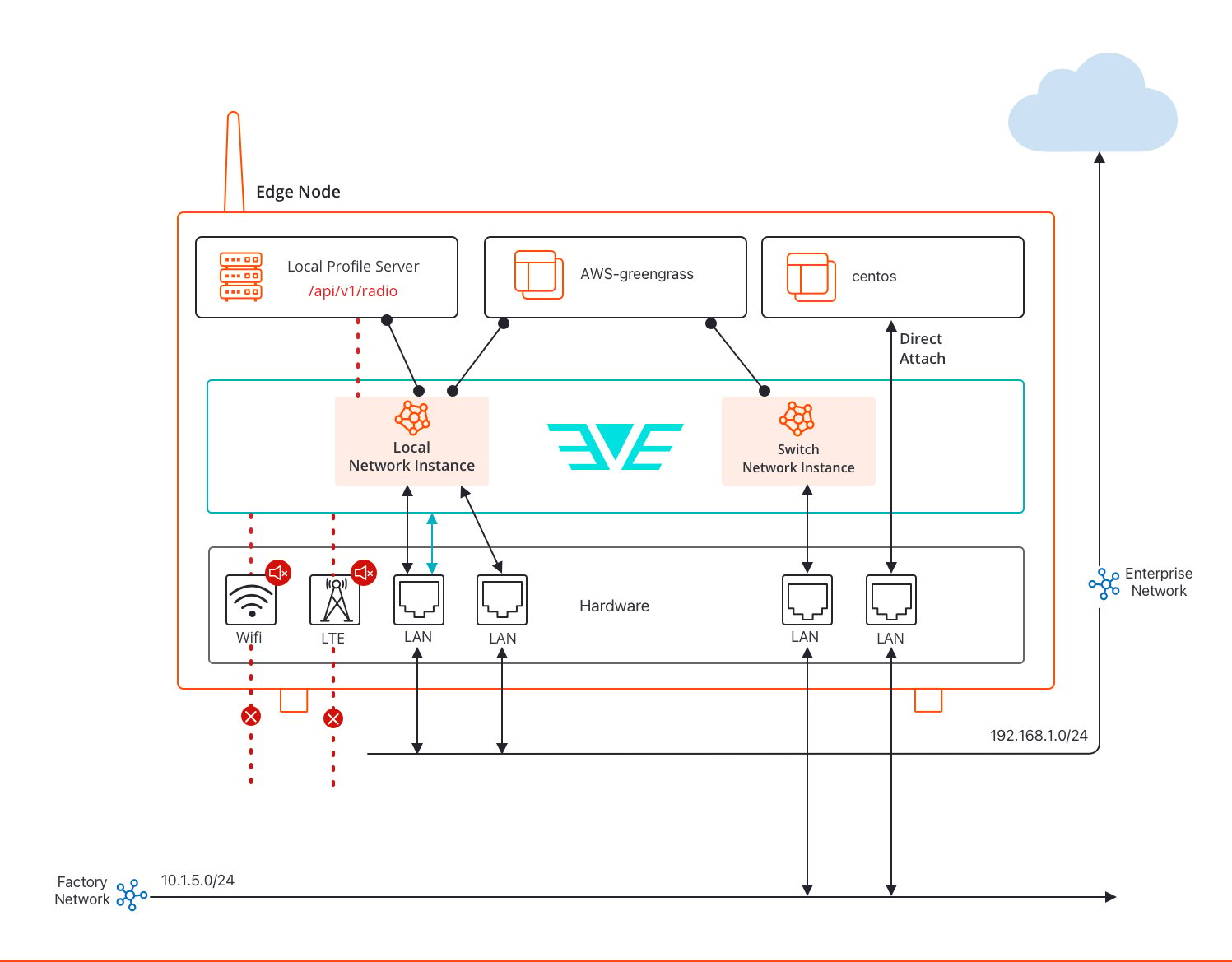
Permanent Radio Silence
Permanent radio silence keeps wireless interfaces administratively disabled at all times. EVE-OS enforces this by default for any wireless adapter (Wi-Fi or cellular) that does not have a network configuration assigned to it. If you configure a wireless adapter with an interface usage of Disabled, EVE-OS prevents the device from emitting any radio signal. You set interface usage on the Adapters tab of a node’s detail page, under NICs. See Configure Node Adapters for instructions. This approach is suitable for deployments in areas where wireless communication is permanently prohibited, and the node uses only wired connectivity to communicate with Edge Infrastructure Services.Temporary Radio Silence
Temporary radio silence disables wireless transmission for a limited period, for example, during a medical procedure or maintenance activity where radio interference is a concern. When temporary radio silence is active and there are no wired alternatives, the node loses connectivity to Edge Infrastructure Services. EVE-OS is designed to tolerate this safely: the node does not reboot, does not fall back to an earlier network configuration, and does not disrupt running applications.Local control only
For safety reasons, temporary radio silence can only be toggled locally, not remotely through Edge Infrastructure Services. EVE-OS uses a Local Profile Server (a designated application running on the node) to control radio silence state. The Local Profile Server application exposes a radio endpoint (/api/v1/radio) that EVE-OS polls every 5 seconds to check the intended radio state. Edge Infrastructure Services is still used to deploy the Local Profile Server application and provide an authentication token, but the actual ON/OFF control happens through the application’s local interface.
Behavior during radio silence
When temporary radio silence is imposed:- EVE-OS stops sending periodic management traffic over wireless interfaces.
- Network connectivity testing and fallback mechanisms are suspended to prevent unwanted configuration changes.
- The node continues running all active applications without interruption.
- EVE-OS publishes the radio state back to the Local Profile Server after applying the change, allowing the local UI to confirm success.
LED indication
When radio silence is in effect, the device status LED blinks five times in rapid succession, then pauses, and repeats. This pattern is consistent regardless of the node’s connectivity state before radio silence was imposed.Persistence
The intended radio silence state persists across node reboots. EVE-OS restores the persisted state when microservices restart after a reboot. Note that there is a brief window during boot before EVE-OS microservices start and apply the persisted state during which a wireless interface may briefly emit signals. Wi-Fi adapters are protected from this using therfkill.default_state=0 kernel command line parameter, which ensures Wi-Fi radios are off by default at boot. Cellular modems rely on the modem firmware supporting configuration persistence.
Once the Local Profile Server application is removed or unconfigured, EVE-OS discards the radio silence state and restores the default behavior, in which radio transmission is enabled for all wireless adapters that have a network configuration assigned.
Limitations
- Cellular modems that support only AT commands (without QMI or MBIM protocol support) cannot be managed by EVE-OS for radio silence. These modems remain in their default state (typically radio on).
- Wireless adapters assigned directly to edge applications (using App Direct assignment) are not covered by radio silence. Those applications must manage their own radio state.
- Bluetooth devices are not covered.
- The rfkill subsystem must include a driver for each Wi-Fi adapter. Run
rfkillfrom the debug console and confirm an entry with typewlanappears for each adapter. - The Local Profile Server and the radio silence controller must be the same application.
Next Steps
Networks Overview
An overview of node port configuration.
Create a Network
Configure wireless network settings on a node port.
Manage App Instances with the Local Profile Server
Set up and configure the radio silence controller application.