 Inference
 Marketplace


Introduction
A network object in Edge Infrastructure Services defines the IP configuration, DNS, NTP, and proxy settings for a physical network port on a node. When you assign a network to a port, EVE-OS uses that configuration to connect the node to the controller and maintain management connectivity. Networks are distinct from Virtual Networks (formerly called Network Instances), which provide connectivity for the edge container workloads running on the node. This section covers node connectivity only.How It Works
Each node has one or more physical network ports. EVE-OS uses a component called the Network Interface Manager (NIM) to apply network configurations to those ports and continuously test whether the node can reach Edge Infrastructure Services. When you create a network object, you define the IP addressing method (DHCP, static IP, or adapter-specific static IP), DNS servers, NTP servers, and optional proxy settings. You then assign that network object to one or more ports on a node. EVE-OS treats the combination of a network configuration and a physical port as a network adapter. EVE-OS can maintain multiple network configurations simultaneously. If the primary management port loses connectivity, EVE-OS automatically falls back to the next available configuration. This failover behavior ensures the node remains reachable even when a single uplink fails.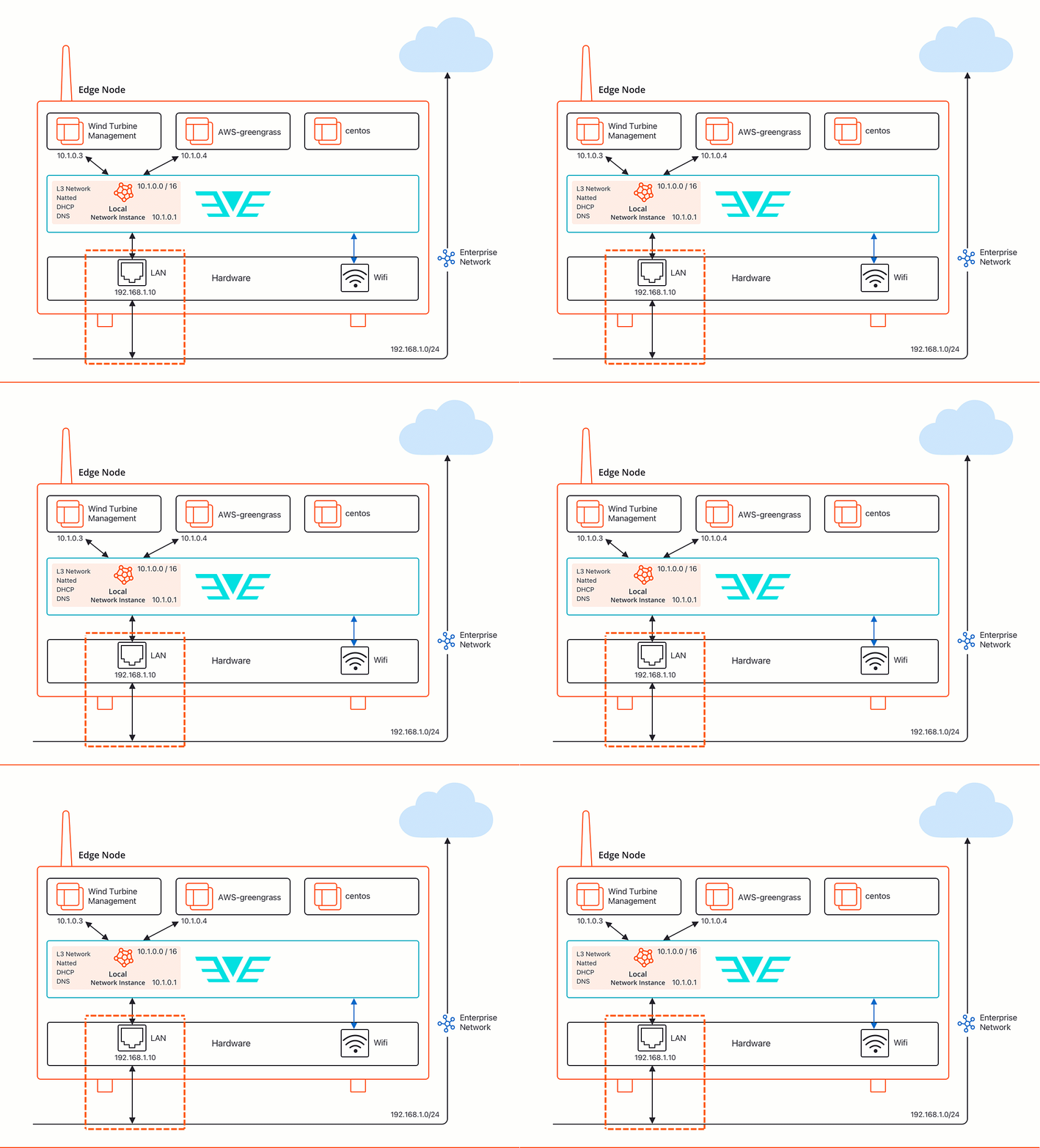
Network adapter interface usage
When you configure a network adapter, you designate how the port is used:- Management: The port carries management traffic between the node and Edge Infrastructure Services. Management ports can also be shared with virtual network instances.
- App Shared: The port is available to virtual network instances for application traffic.
- App Direct: The port is assigned directly to a single edge container using PCI passthrough.
- Disabled: The port is administratively disabled. This is the default for wireless interfaces, which suppresses radio transmission until explicitly enabled.
- VLANs Only: The port is used to segment a physical adapter into multiple logical networks.
Network adapter port-based access control
Network adapters that connect to switch ports requiring port authentication can be marked as 802.1x-eligible. When 802.1x is enabled at the project level, EVE-OS uses EAP-TLS certificate-based authentication to gain access to the network before normal traffic is permitted. See 802.1x Port-Based Network Access Control Overview for details.Network adapter labels
An adapter label is a free-form string that you can assign to one or more network ports. You can designate multiple ports into a group by assigning them the same adapter label. You can also assign multiple adapter labels to a port so that it belongs to multiple groups. For example, you could assign “internet” or “internet-access” to every port with Internet access. You can use adapter labels for scenarios such as grouping management ports, grouping port-forwarding ports, and grouping internet ports.IP addressing options
EVE-OS supports three IP addressing modes:- DHCP Client: The port requests an IP address from a DHCP server on the network.
- Static IP: You assign a fixed IP address, subnet, gateway, and DNS configuration to a specific Network object. That object can be reused across multiple ports.
- Static IP (Adapter Specific): You create a general-purpose network template without specifying an IP address. The specific IP details are entered at node onboarding time for each individual port.
Wireless support
EVE-OS supports Wi-Fi and cellular (LTE/5G) interfaces as management uplinks. Wi-Fi requires SSID credentials at network creation time. Cellular connections require APN configuration and optional radio access technology preferences. You can enable connectivity probing on cellular adapters to confirm reachability to a target IP address.Uplink cost and failover
When a node has multiple management ports, each port can be assigned a cost value between 0 and 255, where 0 means free. EVE-OS prefers lower-cost ports for management traffic. If all ports at a given cost lose connectivity, EVE-OS automatically fails over to ports at the next higher cost level. When two or more management ports share the same cost, EVE-OS distributes management traffic across them in a round-robin pattern. This provides load spreading across redundant uplinks of equal preference. A common pattern for remote deployments is to assign cost 0 to Ethernet ports and a higher cost (for example, 10) to a cellular modem. The modem is then only used if every Ethernet uplink fails. You assign the cost value when you configure a network adapter on a node port.Proxy configuration
Enterprise networks often route traffic through a proxy before it can reach external services. EVE-OS supports four proxy modes, which you configure in the IP Configuration section of a network object:- Transparent: The proxy intercepts traffic without any client-side configuration. If the proxy also inspects TLS-encrypted traffic, upload a CA certificate so EVE-OS trusts the proxy’s generated certificates.
- Manual: Specify the proxy host and port explicitly. Use this for standard explicit proxy environments.
- PAC file: Supply a Proxy Auto-Config script directly. EVE-OS evaluates the script to determine the proxy address for each request URL.
- Auto proxy discovery: EVE-OS uses DHCP and DNS with WPAD protocols to discover the proxy address automatically, without manual entry.
Key Benefits
- Reliable controller connectivity. EVE-OS tests management port reachability continuously and automatically fails over to alternative uplinks when the primary connection is lost.
- Flexible IP addressing. Choose between DHCP, static IP per port, or adapter-specific static configuration to match your deployment environment.
- Proxy support. Configure transparent, explicit, PAC-file, or auto-discovery proxies at the network level to satisfy enterprise network security policies.
- Radio silence. Disable wireless transmission on demand to meet safety and regulatory requirements in environments where radio frequency emissions are restricted.
- 802.1x port authentication. Authenticate nodes to enterprise network switches using certificate-based identity before the port is granted access to production VLANs.