 Inference
 Marketplace


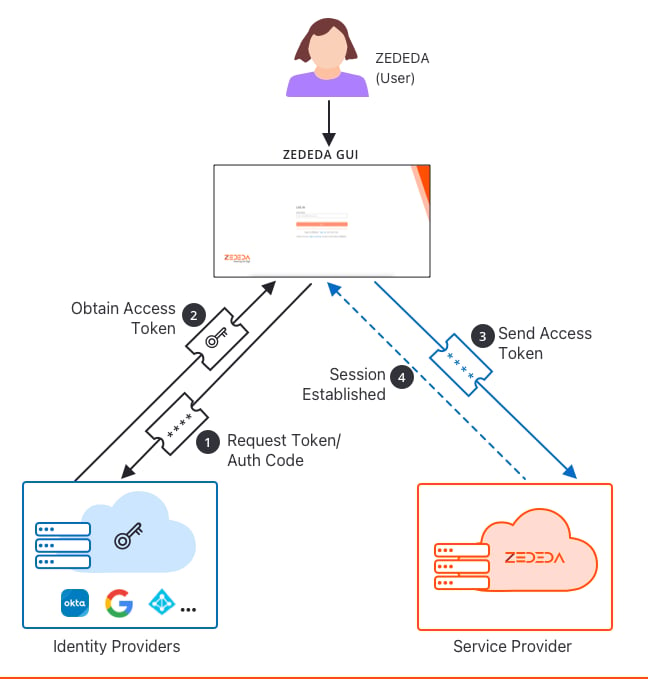
Configuration Concepts
Realms
A realm is the domain of a user’s email address. Edge Infrastructure Services uses the realm to decide whether a user must authenticate through SSO. Enter realms as bare domain names, without a leading@ or any other prefix:
A value containing
@ fails domain-name validation.
- When a realm is configured on an enterprise, Edge Infrastructure Services redirects users whose email address belongs to that domain to the configured Identity Provider. Only OAuth users belonging to a configured realm can log in to the enterprise.
- You can configure multiple realms for one enterprise, for example
zededa.com,zededa.dev, andzededa.net. - All realms in an enterprise resolve to the same Identity Provider, because only one authorization profile can be active per enterprise.
Authorization profiles
An authorization profile determines which Identity Provider validates user credentials. In the Edge Infrastructure Services console, this is presented as the External Authentication Profile; in the API and in ZCLI (the ZEDEDA command-line interface) the object is an authorization profile (zcli auth-profile).
- You can use any OIDC-compliant Identity Provider. ZEDEDA provides dedicated profile types for Azure AD and Google; other providers, including Okta, are configured as a custom OAuth profile using their client ID, client secret, and OpenID Connect endpoint.
- An enterprise can hold more than one authorization profile, but only one profile can be active at a time. Because only one profile is active, only one Identity Provider is in effect: you cannot run Azure AD and Google simultaneously for the same enterprise.
- Mark a profile
--test-onlyto stage it without putting it into service, and--activeto make it the profile in effect. - The profile type is fixed when the profile is created.
zcli auth-profile updatecannot change it; create a new profile instead.
Enterprise inheritance
SSO configuration applies at the enterprise level. When SSO is enabled for an enterprise, every user in that enterprise authenticates through SSO. SSO cannot be enabled or disabled per user. A child enterprise can inherit its authorization profile from its parent. The--inherit-auth setting controls this.
- Inheritance enabled: the child enterprise uses the parent’s configuration. You cannot configure a separate profile for that child.
- Inheritance disabled: you can configure a specific authorization profile for that child enterprise.
-
Changing the setting later: you can only turn inheritance on, never off:
If an enterprise must be able to stop inheriting, do not enable inheritance in the first place.
-
Self-signup enterprises cannot inherit authentication from a parent, regardless of the
--inherit-authvalue.
User permissions and roles
SSO handles authentication (verifying identity), not authorization (access rights).- Users who sign in through SSO are recognized as OAuth users.
- An administrator must grant roles to those users before they can do anything. The system-defined roles are
SysAdmin,SysManager,SysOperator, andSysMonitor; you can also use user-defined roles. - An authenticated SSO user with no role assignment cannot access enterprise resources.
- Roles must already exist in ZEDEDA. The Identity Provider only selects which existing role a user receives; it cannot create roles. See Role Management.
Configuration methods
Both the UI and ZCLI can manage SSO:- Edge Infrastructure Services console: enable and configure the external authentication profile and manage realms.
- ZCLI: full lifecycle management of realms (
zcli realm) and authorization profiles (zcli auth-profile), plus the enterprise-level--inherit-authsetting onzcli enterprise createandzcli enterprise update. See Manage SSO with ZCLI.
Before You Begin
Register Edge Infrastructure Services as a client on your authentication server. The user or resource owner must complete the client registration process. Provider documentation:- Google as an authentication server
- Create an OAuth 2.0 app in Okta
- Protect an API by using OAuth 2.0 with Azure Active Directory and API Management
Callback URL
Configure this callback (redirect) URL at your Identity Provider:https://zedcontrol.zededa.net/oauth/callback
Include the https:// scheme. Identity Providers reject redirect URIs that omit it.
Attributes to collect
Obtain the following from your Identity Provider before you start. This is a one-time exercise.- Client ID
- Client Secret
- OpenID Connect endpoint
Enable OAuth for Your ZEDEDA Enterprise
ZEDEDA onboards an enterprise with local admin authentication. The user or resource owner enables third-party authentication when needed. Keeping a local administrator account is a deliberate fail-safe: if your Identity Provider is misconfigured or unreachable, a local admin can still sign in and correct the configuration. This separation also suits organizations where the team that runs the authentication server is not the team that administers ZEDEDA. To enable OAuth using local user authentication:- Log in to the Edge Infrastructure Services console.
- Select your profile avatar in the top navigation.
- From the dropdown, select Enterprise Settings.
- In the sidebar, under Security & Access, select Authentication.
- In the Single Sign-On card, click Edit.
- In the Authentication Provider dropdown, select Custom OIDC.
- In the Authentication Type dropdown, select OAuth.
- Complete the remaining profile attributes described in Authorization profile attributes, then click Save.
Authorization profile attributes
The Custom OIDC form is organized into four subsections.Provider settings
Credentials
Token settings
User provisioning
Additional parameters
Extra key-value pairs appended to the authorization request URL, for providers that require non-standard parameters. Click Add to add a parameter.Default Role for New Users only applies when Auto-create users on first login is enabled. If you disable auto-create, assign roles to users when you create them manually.
Find your OpenID Connect endpoint
You can read the OpenID Connect endpoint from your provider’s OpenID configuration document:- Google:
https://accounts.google.com/.well-known/openid-configuration - Okta:
https://<your-okta-domain>/.well-known/openid-configuration, where<your-okta-domain>is the Okta domain issued to your organization.
Role Management
ZEDEDA resolves a role for each OAuth user from the ID token, using custom claims (key-value attributes) configured on your authorization server.How a role is resolved
- ZEDEDA reads the role claim from the ID token. By default it reads the claim named
roles. If you set the Scope attribute on the profile, ZEDEDA reads that claim name instead. - The claim value might be a single string or an array of strings. Each value is treated as a candidate role name.
- ZEDEDA compares the candidate names against roles that already exist in the enterprise and uses the first match.
- If no candidate matches an existing role, or the claim is absent, ZEDEDA assigns the profile’s Default Role for New Users.
Example: group claims in Okta
Some authorization servers, including Okta, can drive role assignment from group membership:- Create a user group in Okta whose name matches a ZEDEDA role, for example
zededa-adminorzededa-users. - Assign the group to the application you registered for Edge Infrastructure Services.
- In the Okta authorization server settings, add a custom groups claim.
- Confirm the groups claim is included in the
id_tokensent to ZEDEDA. ZEDEDA uses it to assign roles. - On the ZEDEDA authorization profile, set the Scope attribute to the name of that claim, for example
groups.
Manage SSO with ZCLI
Realms
zcli realm create zededa.com --enterprise=acme --title="ZEDEDA".
Authorization profiles
--type is only accepted on create; a profile’s type cannot be changed later.
Enterprise inheritance
Switch Between OAuth and Local Authentication
- Enabling OAuth blocks the creation of new local users. Local user accounts that already existed continue to work: they remain listed and their owners can still sign in and use ZEDEDA while an external profile is configured.
- Disabling OAuth restores normal local user creation.
Disable SSO
- Select your profile avatar in the top navigation and select Enterprise Settings.
- In the sidebar, under Security & Access, select Authentication.
- In the Single Sign-On card, click Edit.
- In the Authentication Provider dropdown, select Local.
- Click Save.
--active flag by activating a different profile, or delete the profile:
User Logout Behavior
When a user logs out of ZEDEDA, ZEDEDA deletes only that user’s session. The user remains signed in to the Identity Provider. ZEDEDA does not perform RP-initiated logout (an OIDC mechanism where the application signals the Identity Provider to end the user’s session), so signing out of ZEDEDA does not sign the user out of the IdP.Troubleshooting
Next Steps
Manage Users
View auto-provisioned users and adjust their role assignments.
Configure Two-Factor Authentication
Enforce 2FA for all users, including those authenticating through SSO.
Enterprise Settings Overview
The full list of enterprise configuration options.