 Inference
 Marketplace


One Cluster Object
Every cluster runs Kubernetes (k3s) on your edge nodes. Edge Infrastructure Services uses it to place application instances, replicate storage, and fail workloads over between nodes. What differs between clusters is whether the cluster’s native Kubernetes surface is exposed to you:- A cluster without Kubernetes access runs application instances only. The Mode column in the Clusters list shows it as Edge Node Cluster.
- A cluster with Kubernetes access also lets you deploy GitOps and Helm workloads and use
kubectl, on the same nodes and at the same time as application instances. The Mode column shows it as K8s Cluster. - An imported cluster is an external Kubernetes cluster that you adopt for GitOps and Helm delivery only. It has no ZEDEDA edge nodes and never runs application instances. The Mode column shows it as Imported K8s Cluster.
Created and imported clusters compared
A load balancer is an opt-in setting for a cluster with Kubernetes access, configured through the ZEDEDA API only. The API accepts one configuration with a network interface and an IP address range (CIDR) for the load balancer to hand out. On a cluster without Kubernetes access, the request is rejected rather than stored. The console does not currently expose this setting.
Cluster Topologies
Edge Infrastructure Services supports three high-availability cluster configurations. You can also create a single-node cluster, with or without Kubernetes access. On a single node, storage replication is degraded: the cluster works, but it has no redundancy until you add nodes.Three-node HA
Three nodes of equal status form the cluster. All three nodes participate in workload execution, high availability, and data replication. A three-node cluster provides a proper quorum for cluster decisions, which is the classic three-node HA model.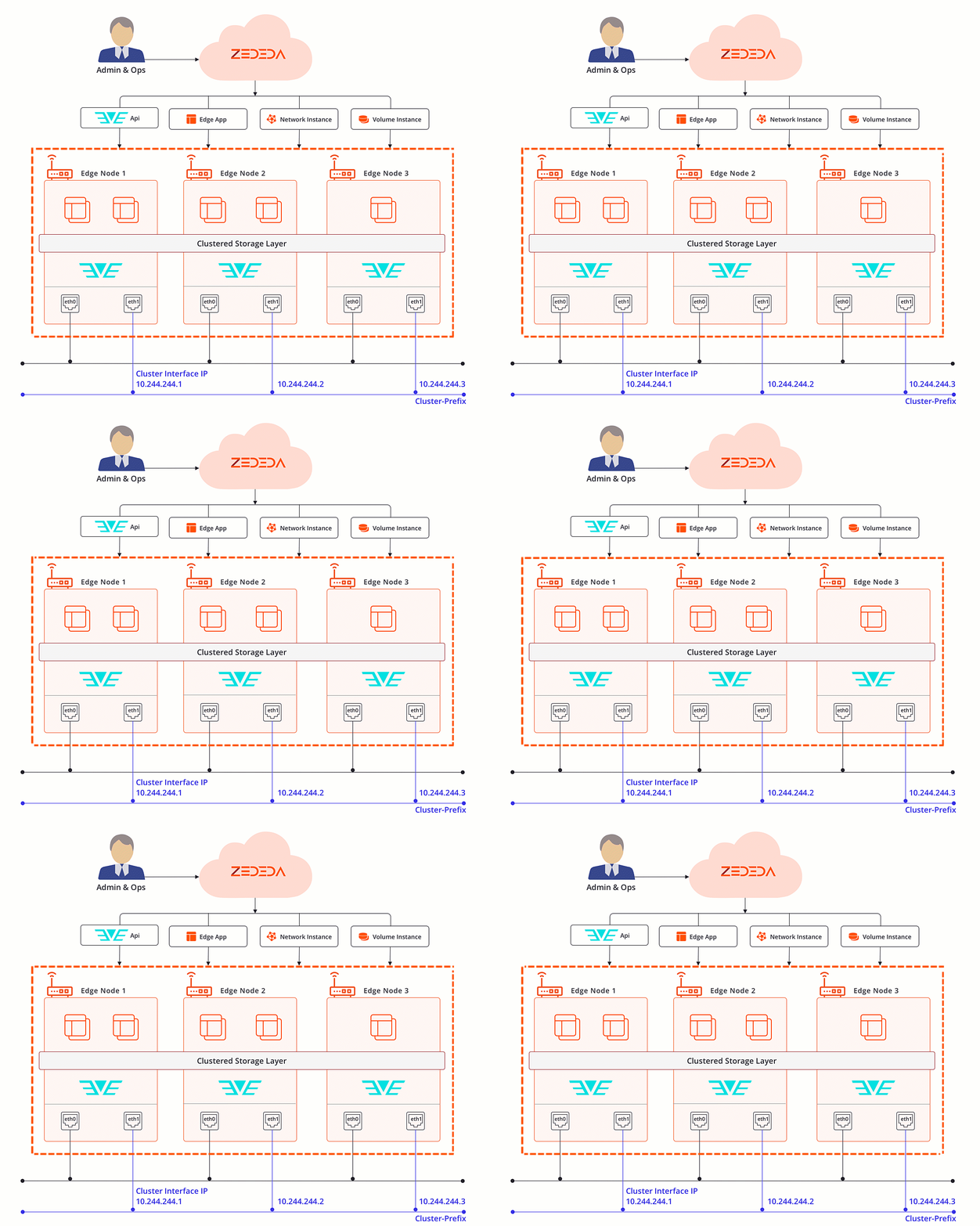
Two-node HA with a tie-breaker
Two primary nodes handle workloads and data replication. A third node is designated as the tie-breaker. The tie-breaker node does not have an app, network instance, or volume instance. The tie-breaker node is still connected to the same network as the non-tie-breaker nodes. The tie-breaker node does not have to be the same hardware as the others. It can have lower CPU, lower memory, lower network bandwidth, and lower performance. The tie-breaker node enables cluster availability if one of the non-tie-breaker nodes fails. You must tag the tie-breaker node withtie-breaker:true before cluster creation. You cannot assign this tag after you create the cluster.
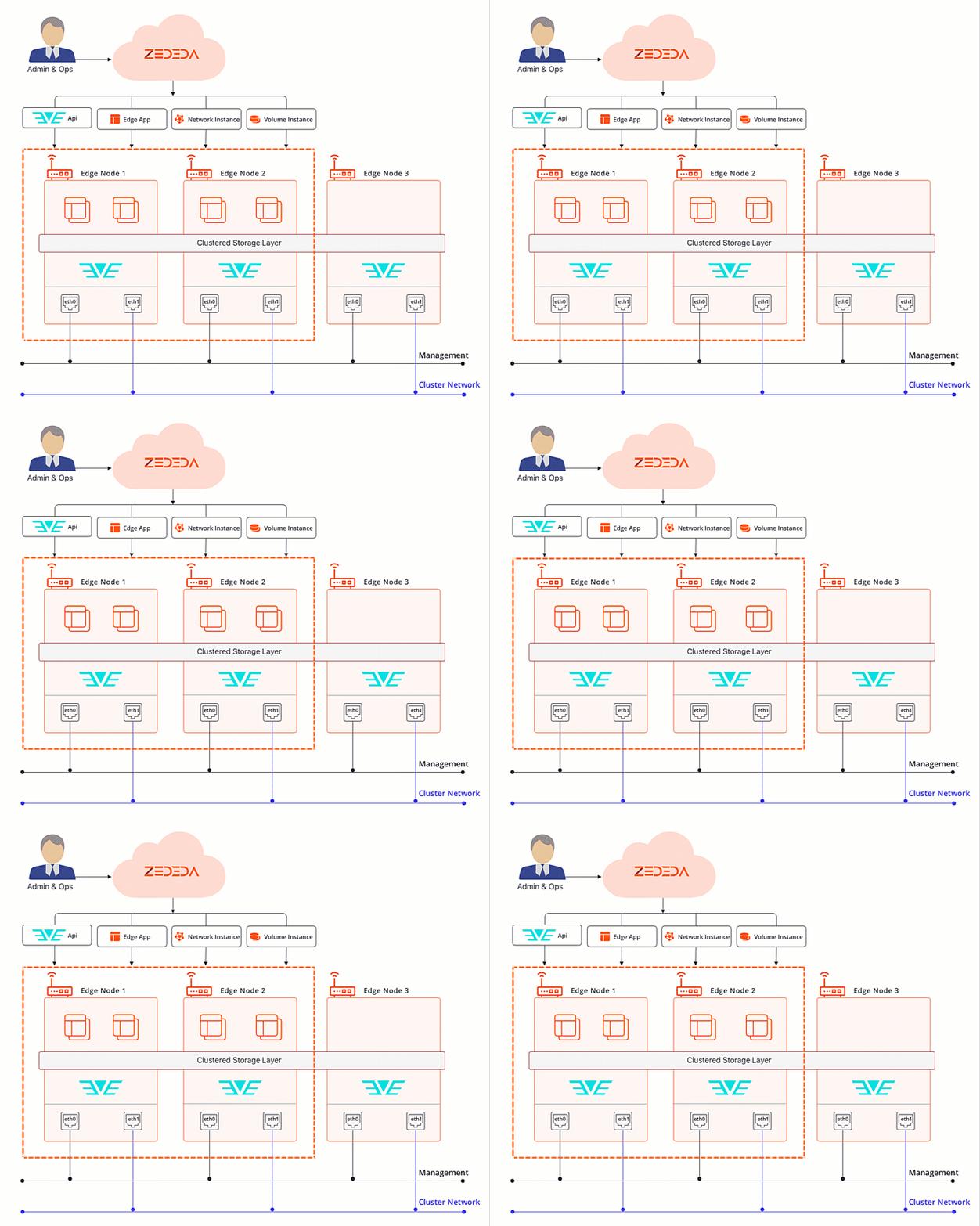
Two-node HA with a witness
Two server nodes handle workloads and data replication. Instead of a third node, an etcd-only witness provides the third quorum vote. The witness runs on the seed node. It is not a Kubernetes node, does not appear in the cluster’s node list, and hosts no workloads. Use this model when a site has only two nodes and no hardware for a tie-breaker. While both nodes are members, applications run on the non-seed node. If a node fails permanently, you can reset the quorum so that the surviving node becomes the seed and runs the cluster on its own until you add a replacement node. Applications on a two-node HA cluster always use preferred node affinity, so they can fail over between the two nodes. You select this model with the Enable two-node HA setting when you create a cluster with exactly two nodes, or when you add a second node to a single-node cluster. You cannot turn two-node HA off after the cluster uses it. The only way to leave the scheme is to delete the cluster. See Create Clusters and Manage Two-Node HA.Automatic Application Migration
When you deploy an application to a cluster, Edge Infrastructure Services automatically selects one node as primary and assigns it responsibility for running the application, managing volumes, and handling network configurations. If the primary node becomes unavailable, the application migrates to another node in the cluster automatically. Your applications require no configuration changes. You can deploy existing applications to clusters without modification. Edge Infrastructure Services continuously tracks application status across all nodes. When an application migrates, Edge Infrastructure Services updates the application status and metrics to reflect the new placement.In This Section
Create clusters
Configure cluster identity, select nodes, and set up the cluster network interface.
Manage clusters
View cluster status, update cluster settings, replace a failed node, and delete clusters.
App instance failover in clusters
Understand how applications fail over during planned maintenance and unexpected node outages.