 Inference
 Marketplace


Introduction
The Terraform Provider for ZEDEDA Cloud lets you define and manage your Edge Infrastructure Services configuration as code using HashiCorp Terraform. The provider is an external CLI-based tool that runs on your local system or automation environment. It communicates with Edge Infrastructure Services through the API. The Terraform provider is an alternative to the Edge Infrastructure Services console and zCLI for configuration management. It is best suited for teams that need repeatable, version-controlled infrastructure definitions or integration with CI/CD pipelines.Limitations
The Terraform provider has two important constraints to be aware of before you begin:- Use either the Terraform provider or the console and zCLI — not both. Managing the same resources with the Terraform provider and the Edge Infrastructure Services console (or zCLI) simultaneously is likely to cause configuration conflicts. Choose one management path and use it consistently.
- Configuration management only. The provider creates, updates, and deletes resources. It does not provide monitoring capability. Use the Edge Infrastructure Services console or zCLI for observability.
Prerequisites
- You have the SysManager or SysAdmin role in your enterprise. See Manage Roles.
- Depending on which objects the Terraform configuration will manage, the token must belong to a user with CRUD permissions on those specific object types.
- Terraform CLI installed on your local system.
- A ZEDEDA Cloud API token. To generate one, go to your user profile (click your name in the header) and select the API Tokens tab.
How the Provider Works
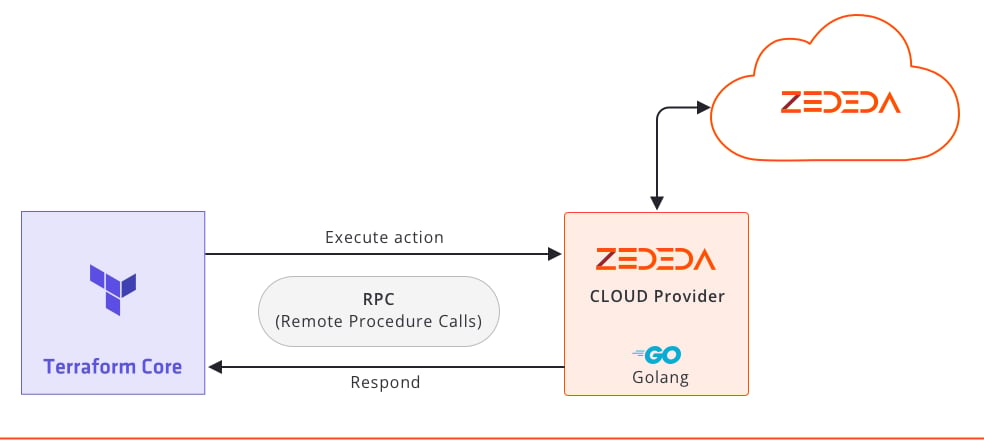
The Terraform Provider for ZEDEDA Cloud communicates with Edge Infrastructure Services through the API. Terraform Core sends execution commands to the Terraform provider, which calls the Edge Infrastructure Services API. The API returns responses that Terraform uses to reconcile state. ZEDEDA Cloud objects correspond to Terraform resources (for objects you create and manage) and data sources (for objects you reference). For example,zedcloud_edgenode is a resource type, while data.zedcloud_project is a data source type.
Object Relationships
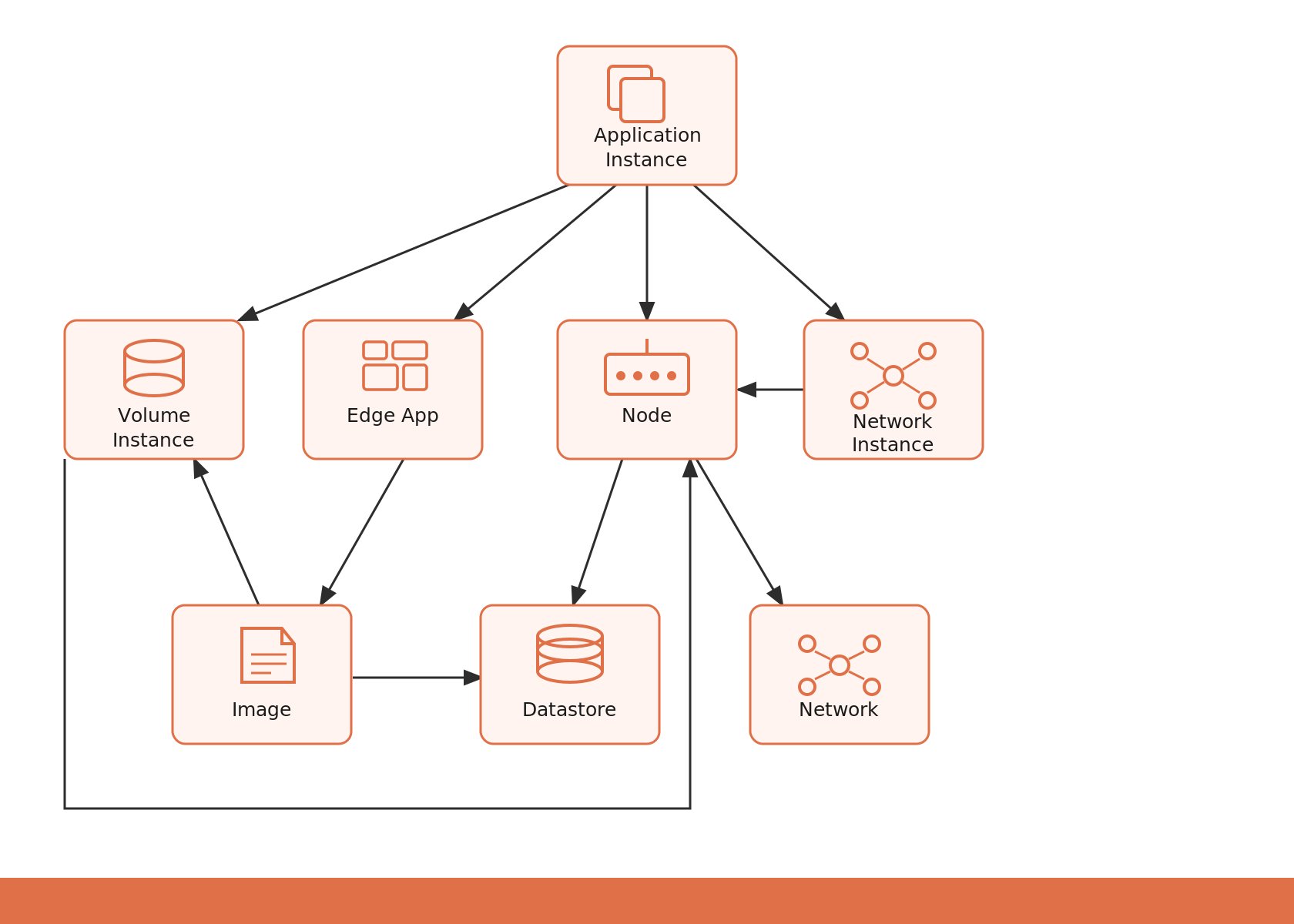
The following ZEDEDA Cloud object types depend on other objects. You must declare these dependencies correctly in your Terraform configuration file so that Terraform provisions resources in the correct order. Key dependencies:- Application instances depend on: volume instances, edge apps, nodes, and network instances.
- Nodes depend on: networks.
- Edge apps depend on: images.
depends_on blocks, or implicitly by referencing other resources or data sources. Implicit dependencies are preferred because Terraform resolves them automatically.
Quick Start
The following steps set up the Terraform provider and provision a basic configuration.-
Create a directory for your Terraform files:
-
Create a
main.tffile and declare the provider version: -
Set the following environment variables in your shell session. Replace the placeholder values with your actual API token and ZEDEDA Cloud URL:
-
In
main.tf, add the provider configuration block and declare the token as a sensitive variable:Marking the token assensitive = trueprevents Terraform from displaying it in plan and apply output. -
Add the resources you want to manage. See the resource schema documentation on the Terraform Registry for available resource types and their fields. An example
main.tfis available in the provider GitHub repository. -
Initialize the working directory:
-
Preview the planned changes:
-
Apply the configuration:
Common Terraform Commands
Import Existing Resources
You can bring existing Edge Infrastructure Services objects under Terraform management using theterraform import command. This is useful when you have resources created through the Edge Infrastructure Services console or zCLI that you want to start managing with Terraform.
To import an existing object:
- Obtain the object’s ID using the Edge Infrastructure Services console or zCLI.
- Add a corresponding resource block in your Terraform configuration file.
-
Run the import command using the format
terraform import RESOURCE_TYPE.RESOURCE_NAME ID. For example:
Protect Secrets
To protect sensitive values (for example, API tokens, passwords, or private keys) in your Terraform configuration, assign them to environment variables prefixed withTF_VAR_. Terraform automatically reads variables with this prefix and passes them to your configuration without storing them in plain text in your files.
For example, to protect a database password:
Next Steps
Rename Terraform Objects
Rename Terraform-managed resources safely without triggering unintended deletions.
Terraform Registry: ZEDEDA Provider
Full resource and data source schema reference.
ZEDEDA Terraform Provider on GitHub
Source code, example configurations, and issue tracker.