 Inference
 Marketplace


Introduction
Edge View provides secure, on-demand remote access to your nodes and the applications running on them. It routes an encrypted tunnel through the Edge Infrastructure Services dispatcher, so you can reach nodes behind firewalls or NAT without a VPN or direct network path. You can open an interactive SSH terminal to EVE-OS (Edge Virtualization Engine), connect to a running application via VNC or SSH, or run the Edge View client script from your laptop for advanced diagnostics. Remote access sessions are governed by a project-level Edge View policy. When a project containing an Edge View policy is assigned to a node, that node inherits the policy settings, including session duration limits, connection count limits, and which access modes are permitted.Prerequisites
- You have the SysManager or SysAdmin role in your enterprise. See Manage Roles.
- At least one node onboarded to Edge Infrastructure Services and assigned to a project.
- An Edge View policy enabled in the project assigned to the target node.
How It Works
Edge View uses a client-server model. The EVE-OS side runs the Edge View server. When you initiate a remote session, Edge Infrastructure Services issues a short-lived JSON Web Token (JWT) that authenticates the session. Your connection travels over a WebSocket Secure (WSS) connection to the dispatcher service running in Edge Infrastructure Services, which relays traffic to the node. The dispatcher cannot decrypt the session traffic. Sessions are time-limited by the JWT token. When a token expires, the session ends and must be re-activated.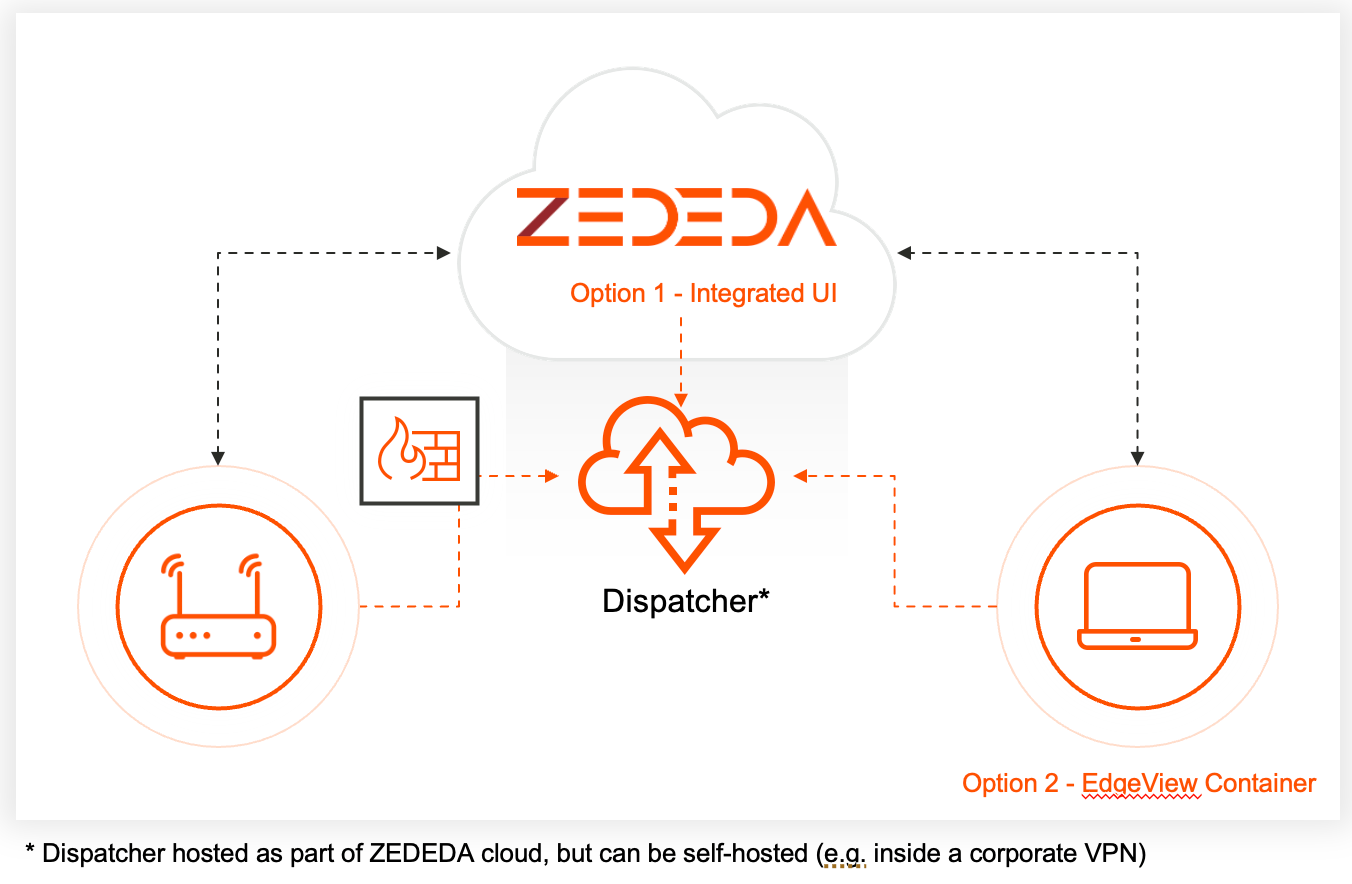
Edge View Policy
The Edge View policy controls whether Edge View is enabled for nodes in a project and sets the rules for each session. You configure the policy in the project settings. The policy includes the following settings. Access Settings
Access Permissions
Session Defaults
To configure the Edge View policy, go to the project settings for the project assigned to your target node, select Policies in the sidebar, and choose Edge View.
Access Methods
Edge View supports the following access methods. SSH to EVE-OS. Opens an interactive SSH terminal directly to the EVE-OS shell of the node. Launched from the node details page in Edge Infrastructure Services using the Remote Console button. VNC to an application. Opens a VNC viewer for the graphical console of a running application instance. Launched from the application instance details page using the Remote Console button, or from the More actions (...) menu on a node, where you first choose which application instance on that node to open. The node menu is available on the node details page and on the Nodes list. This access method requires the Access Edge Applications permission in the project Edge View policy. See Open Remote Console (VNC) From a Node.
SSH to an application. Opens an SSH terminal to a running application instance. Launched from the application instance details page using the SSH Terminal button. Requires the username, port, and an SSH private key.
Edge View client script. Downloads a shell script that runs the Edge View Docker container on your laptop, creating a local tunnel to the node. This method gives you the full set of Edge View diagnostic commands and is described in Configure Edge View (Advanced Method).
Troubleshoot CLI. Opens an interactive Edge View command console in a drawer at the bottom of the browser. Launched from the More actions (...) menu on the node detail page. Runs Edge View commands such as ping, ls, dmesg, and ps directly on the node without additional software. This item is not currently available and is hidden in the console for all users in this release. When it is restored, it is also hidden when Edge View is not enabled in the project policy. See Configure Edge View with the GUI for the procedure.
Security
Edge View is designed so that the dispatcher never has access to session content. Key security properties include:- Sessions are authenticated by a JWT signed by the Edge Infrastructure Services controller.
- Traffic is protected by TLS between all participants.
- You can enable optional end-to-end encryption in the Edge View policy for additional protection.
- Access can be restricted to users with pre-registered SSH public keys using the
keyedgeview.authen.publickeyconfiguration property on the node. - Session duration and connection count limits bound the exposure window.
- All commands are logged and appear as events on the node.
Edge Access Standalone Application
The former standalone Edge Access login URL is obsolete. Use the Edge View console procedures to configure and start remote sessions.Next Steps
Configure Edge View with the GUI
Set the Edge View policy and start remote sessions from the Edge Infrastructure Services console.
Configure Edge View with the CLI
Enable Edge View for projects and nodes using ZCLI commands.
Configure Edge View (Advanced Method)
Use the Docker-based Edge View client script for full diagnostic access.
Manage Nodes with EVE-OS Local UI
Direct on-device access when the node is disconnected from Edge Infrastructure Services.